
You do not need a Silicon Valley budget, a 40-slide marketing deck, or a mystical SEO wizard in a hoodie to improve your WordPress website.
You do need a clear plan.
Affordable WordPress SEO packages can help startups, local businesses, WooCommerce stores, and bloggers get found on Google without signing up for a giant agency retainer that makes your bank account flinch.
“Affordable” and “cheap” are not twins; they are distant cousins who do not always get along at family dinners.
A good package focuses on the core work that most improves visibility: keyword research, page optimization, speed fixes, local SEO, content support, tracking, and monthly reporting.
A bad package gives you vague promises, mystery backlinks, and an invoice that somehow costs more than the work itself.
This guide breaks down what to expect, what to pay, and how to choose affordable WordPress SEO services in the USA without being sold digital smoke and mirrors.
Quick takeaway: An affordable package is not the lowest-priced one. It is the package that gives your business the clearest path to more qualified traffic, calls, leads, sales, or bookings.
Table of Contents
What Are Affordable WordPress SEO Packages?
Affordable WordPress SEO packages are structured as either monthly or one-time services designed to improve how a WordPress website performs in Google Search. They focus on the SEO work that matters most first.
They usually focus first on the SEO work a small business actually needs, rather than stuffing a proposal with fancy words and unnecessary tasks. Think of it like a well-tailored blazer: it does not need to be covered in logos to do its job. It just needs to fit properly.
A solid WordPress SEO package may include:
- Keyword research for your products, services, locations, or blog topics
- A WordPress SEO audit
- On-page optimization for important pages
- Title tag and meta description improvements
- Internal linking improvements
- Image alt text and image SEO
- XML sitemap, robots.txt, canonical tag, and indexing checks
- Broken-link and redirect fixes
- WordPress speed optimization and Core Web Vitals improvements
- Local SEO support for service businesses
- Content optimization or blog writing
- Schema markup implementation
- Google Search Console and Google Analytics tracking
- Monthly reports showing completed work and performance trends
Google itself recommends making pages easy to crawl and understand by using descriptive titles and headings, creating helpful, people-first content, and using crawlable internal links. It also recommends monitoring performance through Search Console rather than guessing whether the work is helping
The goal is not to “trick” Google. It is to make your site more useful, clearer, faster, and easier for both search engines and real humans to navigate. Boring? A little. Effective? Very.
Affordable vs. Cheap WordPress SEO
Let’s settle this before someone offers you “10,000 backlinks for $49.”
Cheap WordPress SEO packages often look tempting because the price is low. But if a provider cannot explain what they will do, which pages they will optimize, how they will earn links, or how they will measure outcomes, the price is not a bargain.
It is a mystery box. And mystery boxes belong at birthday parties, not in your marketing budget.
| Factor | Affordable WordPress SEO | Cheap WordPress SEO |
| Pricing | Fair for a defined scope | Low price with vague deliverables |
| Strategy | Customized around your site and goals | One-size-fits-all checklist |
| Keywords | Based on search intent and competition | Random keyword stuffing |
| Content | Helpful, edited, and relevant | Thin, recycled, or automated at scale |
| Links | Earned ethically or clearly excluded | Bulk, spammy, or undisclosed links |
| Reporting | Rankings, traffic, leads, tasks completed | Vanity metrics or no report |
| Access | You retain ownership of accounts and content | Provider may restrict access |
| Expectations | Gradual, measurable progress | “Guaranteed #1 rankings” |
Google’s spam policies explicitly warn against manipulative practices such as link spam, keyword stuffing, cloaking, scaled content abuse, and misleading redirects.
Sites that violate these policies may rank lower or be excluded from Google Search.
So yes, you should be budget-conscious. But do not buy SEO as if you were shopping for clearance socks at 11:58 p.m.
Quality still matters.
7 Features Every Affordable WordPress SEO Package Should Include
1. A Real WordPress SEO Audit
Before anyone starts “optimizing,” they should inspect what is already happening on your website.
A proper WordPress SEO audit should look for:
- Pages blocked from indexing
- Broken internal links and broken external links
- Duplicate or weak page titles
- Missing meta descriptions
- Slow pages and poor mobile usability
- Redirect errors
- Sitemap problems
- Incorrect canonical tags
- Thin content
- Missing schema markup
- Plugin conflicts
- WooCommerce category and product-page gaps
- Opportunities to improve internal linking
This is especially important if your site has been around for a while. WordPress websites can collect old pages, unused plugins, redirect chains, random drafts, duplicate tags, and enough forgotten SEO debris to make a digital archaeologist smile.
A useful audit should not just list problems. It should prioritize them. You need to know what to fix first, what can wait, and what could actually improve leads or sales.
2. Keyword Research That Matches Buyer Intent
A small business does not need to rank for every keyword. It needs to rank for the words people most likely to become customers use.
For example, a Dallas plumbing company may benefit more from targeting:
- “emergency plumber Dallas”
- “water heater repair Dallas”
- “drain cleaning near me”
…than from chasing a broad phrase like “what causes low water pressure.”
Blog traffic can be useful. But bills are typically paid by customers, not by people who landed on your website at 2 a.m. while researching a strange noise in their bathroom pipes.
Your package should include keyword research and a keyword-to-page map.
That simply means assigning a main search topic to each important service page, product category, location page, or blog post.
| Website type | Best keyword focus |
| Local service business | City + service keywords, Google Maps visibility |
| Startup or B2B company | Problem-based and solution-based commercial keywords |
| WooCommerce store | Product, category, comparison, and buying-intent keywords |
| Blogger or creator | Topic clusters, informational queries, internal linking |
| New business | Low-competition local and long-tail commercial keywords |
3. WordPress On-Page SEO Services
On-page SEO is the work done directly on the pages people and search engines see.
A package should clearly state how many pages are optimized each month. For a small website, that might be five priority pages.
For a larger site, it may include more service pages, location pages, product categories, or blog posts.
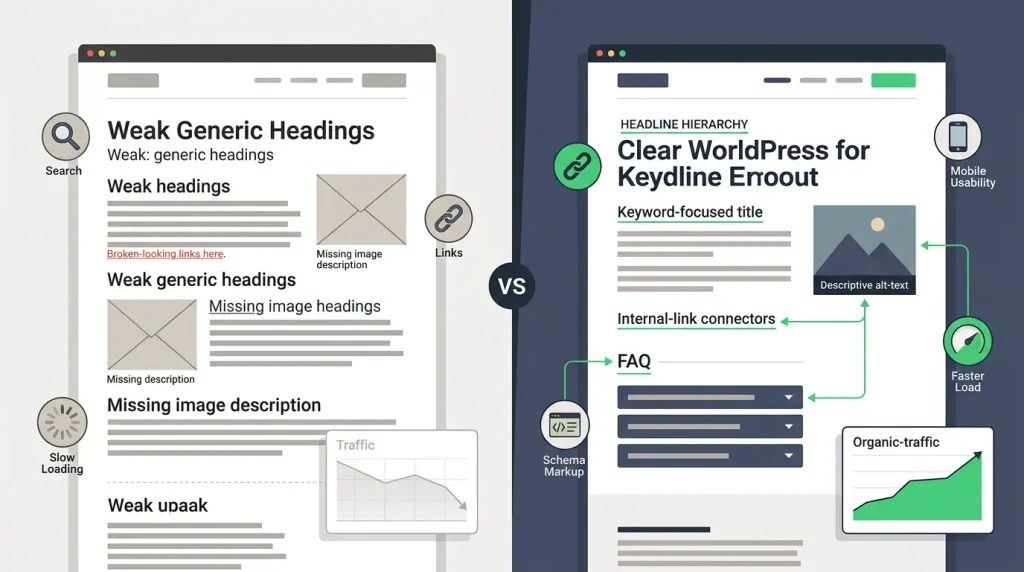
Typical WordPress on-page SEO services include:
- Improving page titles and meta descriptions
- Updating H1, H2, and H3 headings
- Strengthening page copy around relevant search intent
- Adding internal links between related pages
- Improving image filenames and alt text
- Adding FAQ sections where they genuinely help users
- Optimizing URL structures where needed
- Adding calls to action that match the page’s purpose
- Updating old blog posts to make them more accurate and useful
Google recommends using words people would use to search for your content in prominent areas such as titles, main headings, alt text, and links. That does not mean repeating “affordable WordPress SEO packages” twenty-seven times like a malfunctioning parrot. It means using natural, useful language in the places that matter.
4. Technical SEO and Site Speed Fixes
Technical SEO sounds intimidating, but the basic question is simple: can Google find, crawl, understand, and index your pages correctly?
For WordPress, technical SEO may include:
- XML sitemap setup and submission
- robots.txt review
- Noindex and indexing checks
- 301 redirect mapping
- Canonical tag checks
- HTTPS and preferred-domain checks
- Mobile usability fixes
- Image compression
- Caching configuration
- Plugin cleanup
- Core Web Vitals troubleshooting
- Lazy loading where appropriate
- Structured data or schema markup
- Crawl error fixes in Google Search Console
Google’s Search Console includes reports to measure Search performance and monitor Core Web Vitals across mobile and desktop experiences. PageSpeed Insights can also test individual pages.
A WordPress SEO company should be honest here: some performance fixes are quick, while others require developer time, hosting changes, theme adjustments, or image cleanup. If somebody promises to “fix every Core Web Vitals issue in one day” without looking at your website, give that promise the side-eye it deserves.
5. Local SEO for Businesses That Serve a City
If you own a salon, HVAC company, law office, dental practice, landscaping business, restaurant, contractor company, or any business where customers come from a local area, local SEO should be part of the conversation.
WordPress local SEO packages may include:
- Google Business Profile optimization
- Local keyword research
- Service-area pages
- Location landing pages
- Local business schema
- NAP consistency checks
- Review-generation guidance
- Local citation cleanup or management
- Google Maps tracking
- Local content ideas based on neighborhoods, services, and customer questions
Your website and your Google Business Profile should work like a good duo. Think peanut butter and jelly. Batman and Robin. Coffee and the false belief that you will only have one cup.
For a local business, an affordable plan that ignores Maps visibility may miss a major source of calls and leads.
6. Content Optimization or Content Writing
Content is often where affordable SEO packages become fuzzy. One provider says “content included,” but that might mean one 500-word blog post.
Another may mean optimizing existing pages.
Another may mean content recommendations with no writing at all.
Ask for specifics:
- How many pages will be optimized?
- How many blog posts are included?
- What is the approximate word count?
- Are service-page rewrites included?
- Who approves content before publishing?
- Is the content written for your customers, not just keywords?
- Does the package include content uploads to WordPress?
- Will you own the finished content?
For a starter plan, refreshing existing service pages and publishing one strong blog post per month can be more valuable than publishing eight rushed articles nobody reads.
Google emphasizes helpful, reliable, people-first content.
That should be your north star, whether a human writer, freelancer, in-house marketer, or agency creates the draft.
7. Transparent Monthly Reporting
SEO should not feel like sending money into a vending machine and waiting for a mystery snack.
A trustworthy monthly WordPress SEO service should report on:
- Organic traffic trends
- Keyword visibility and priority rankings
- Google Search Console impressions and clicks
- Leads, calls, form submissions, or ecommerce revenue where tracking exists
- Pages optimized
- Technical fixes completed
- Content published or updated
- Links earned, if link-building is included
- Next month’s priorities
- Obstacles or dependencies on your side
You should also retain access to Google Analytics, Google Search Console, your WordPress website, and any advertising or citation accounts used in your campaign.
If an agency keeps all the keys, that is not a partnership. That is a hostage situation with spreadsheets.
WordPress SEO Pricing: What Should You Pay?
WordPress SEO pricing depends on your competition, site size, goals, location, content needs, and technical health. A tiny local site with six pages has different needs from a 2,000-product WooCommerce store. Thankfully, your SEO proposal should recognize that obvious fact.
For foundational small-business SEO, market guides often cite a rough range of $500 to $1,500 per month, while more competitive local, content-heavy, ecommerce, or multi-location campaigns can cost more.
Here is a practical way to think about monthly WordPress SEO pricing:
| Package level | Typical monthly budget | Best for | Common deliverables |
| Starter | $199–$500 | New sites, bloggers, very small local businesses | Audit, basic setup, 2–5 pages optimized, metadata, tracking, simple technical fixes |
| Growth | $500–$1,500 | Growing service businesses, startups, local brands | Ongoing page optimization, content support, local SEO, technical tasks, reporting |
| Ecommerce or competitive | $1,500–$3,000+ | WooCommerce stores, multi-location businesses, competitive industries | Deeper technical SEO, category/product work, content production, CRO support, reporting |
| Enterprise or highly competitive | $3,000+ | Large sites and national brands | Advanced technical work, large-scale content, digital PR, analytics, development support |
Some providers market WordPress-focused entry plans below $500 per month. For instance, the Affordable SEO Services lists tiers starting at $199 per month, while its site also notes availability from $299 per month; confirm the exact live scope before buying.
At the higher end, WebFX lists SEO plans starting around $3,000 per month, which may be beyond the comfort zone of a new business but can serve as a useful benchmark for the defined scope of page optimization and reporting.
The lesson is simple: do not compare prices alone. Compare the scope per dollar.
One-Time WordPress SEO vs. Monthly SEO
Not every business needs a full monthly retainer on day one.
A one-time WordPress SEO audit or setup project can make sense if your website has never been optimized, you are launching a new site, or you have an in-house person who can handle ongoing content and updates.
| One-time WordPress SEO | Monthly WordPress SEO services |
| Best for a new launch or cleanup | Best for ongoing growth |
| Includes audit, setup, priority fixes | Includes recurring optimization and reporting |
| May improve foundations quickly | Builds momentum over time |
| Limited ongoing content support | Supports new pages, blogs, links, local updates |
| Usually a project fee | Usually a month-to-month or contract retainer |
A one-time project can tidy the house. Monthly SEO helps keep it tidy as you add new rooms, invite guests, and make sure Google can still find the front door.
For many small businesses, the smartest move is a hybrid approach:
- Start with an audit and high-priority technical cleanup.
- Optimize the most important service, product, or location pages.
- Continue with monthly content, local SEO, internal linking, reporting, and improvements.
WordPress SEO Plugins: Yoast, Rank Math, and Reality
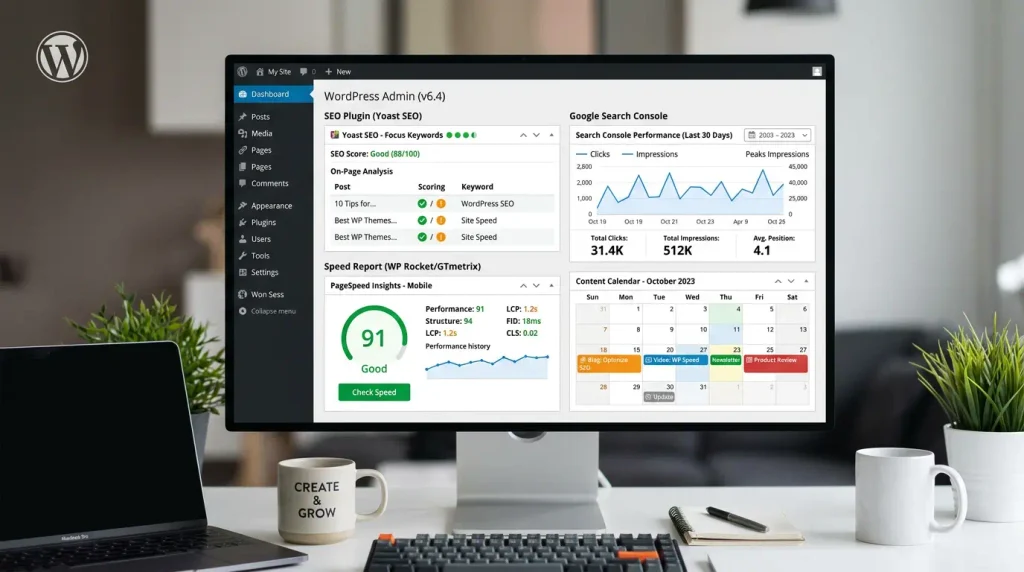
A good WordPress SEO agency may use Yoast SEO, Rank Math, All in One SEO, SEOPress, or another tool. The plugin itself is not the strategy.
Let me repeat that with a tiny drumroll: installing an SEO plugin is not the same as doing SEO.
Plugins can help manage:
- SEO titles and meta descriptions
- XML sitemaps
- Basic schema
- Canonical settings
- Open Graph tags
- Redirects, depending on the plugin
- Content checks and readability suggestions
But they cannot independently decide which keywords will bring buyers, rewrite a weak service page, fix your hosting setup, create a local SEO strategy, earn credible links, or turn a bland product description into something worth ranking for.
Ask your provider which plugin they use and why. More importantly, ask what work they will actually perform inside WordPress.
Do Affordable Packages Include Link Building?
Sometimes. But this is where you should ask better questions.
White-hat WordPress link-building services focus on earning links through real value, relationships, useful content, local partnerships, digital PR, directories that matter, supplier pages, industry associations, and editorial placements.
Be cautious if a provider says things like:
- “We guarantee 500 backlinks every month.”
- “We own a private blog network.”
- “You do not need to know where the links come from.”
- “We can get you to #1 in 30 days.”
- “We submit your site to 1,000 search engines.”
Google’s policies specifically identify link spam and other ranking-manipulation tactics as violations that can harm a site’s visibility.
A perfectly acceptable answer from an affordable WordPress SEO company is: “Link building is not included at this price.” Honest exclusions are far better than mystery links.
How Long Does WordPress SEO Take?
Most businesses should expect SEO to take time. A realistic early window for noticeable movement is often three to six months. However, the timeline depends on your existing website, competition, location, technical issues, content quality, and how quickly fixes are implemented.
You may see technical improvements sooner. For example, fixing accidental noindex tags, broken redirects, or sitemap errors can help Google access your pages more reliably. But gaining meaningful rankings for competitive searches often takes longer because you are competing with established websites that already have content, links, brand awareness, and history.
Here is a reasonable expectation:
| Timeframe | What may happen |
| Month 1 | Audit, tracking setup, technical priorities, keyword map |
| Months 2–3 | Core pages optimized, local improvements, content updates, early visibility changes |
| Months 3–6 | More impressions, rankings, organic visits, and better lead tracking |
| Months 6–12 | Stronger content footprint, more topical authority, scalable growth opportunities |
Anyone selling instant rankings is selling a fantasy. Nice fantasy. Terrible business decision.
How to Choose an Affordable WordPress SEO Agency
Choosing a WordPress SEO agency is not about finding the loudest website or the most dramatic case-study headline. It is about finding a provider whose work makes sense for your business.
Use this checklist before you sign anything.
Ask these questions
- What pages, keywords, and locations will you optimize each month?
- Will you fix issues directly in WordPress, or only send recommendations?
- What technical SEO work is included?
- Does the plan include keyword research and keyword-to-page mapping?
- Do you offer WordPress speed optimization and Core Web Vitals support?
- Is local SEO included if I serve customers in a specific city or region?
- Is WooCommerce SEO included for product and category pages?
- How many blogs, content refreshes, or service pages are included?
- Is link building included? If so, how are links earned?
- Which reports will I receive every month?
- Will I own my website content, analytics accounts, and Google Search Console access?
- Can I cancel monthly, or is there a long-term contract?
- Do you have WordPress or WooCommerce case studies?
- What is not included in the price?
Providers worth comparing
The right provider depends on your budget and needs. These are not one-size-fits-all recommendations; they are useful names to compare based on transparent scope, WordPress expertise, technical depth, or small-business positioning.
| Provider | Best fit | Pricing or scope note |
| The Affordable SEO Services | Smaller WordPress sites and budget-conscious businesses | Lists WordPress plans starting at $199/month; confirm exactly what is included |
| Thrive Internet Marketing Agency | Businesses needing SEO, local SEO, and broader marketing support | States small-business SEO can range from $500–$5,000/month |
| Coalition Technologies | Businesses that need ongoing SEO plus implementation support | Offers custom packages and promotes month-to-month contracts |
| OuterBox | Technical WordPress or WooCommerce websites | Better suited to complex ecommerce and technical SEO needs |
| WebFX | Established businesses wanting larger-scale reporting and SEO support | Plans start around $3,000/month |
OuterBox highlights work such as crawlability, rendering, indexing, Core Web Vitals, redirects, canonical tags, schema, and migration monitoring—useful capabilities for technically complex WordPress or WooCommerce websites.
What Is Usually Not Included?
A strong proposal does not pretend every possible marketing activity fits into a $299 monthly package. That is not negative. It is professional.
Depending on the provider, you may need to pay extra for:
- Complete WordPress redesigns
- Custom theme development
- Hosting migrations
- Large-scale ecommerce product copywriting
- Professional photography or video
- Paid advertising management
- Advanced conversion-rate optimization
- Digital PR campaigns
- Extensive backlink outreach
- Multi-location SEO at scale
- Reputation management
- Emergency website repair
- Legal, medical, or financial compliance review
If it is not in writing, assume it is not included. Save yourself the awkward email later.
FAQs About Affordable WordPress SEO Packages
1. What is included in an affordable WordPress SEO package?
Most affordable WordPress SEO packages include an audit, keyword research, on-page optimization, basic technical SEO, internal linking, metadata improvements, Google Search Console setup, and monthly reporting. Content, local SEO, and link building may be included at higher tiers or offered as add-ons.
2. How much do WordPress SEO services cost per month?
Small-business WordPress SEO pricing often ranges from $500 to $1,500 per month for a meaningful, foundational campaign. Lower-priced starter packages may work for small sites with limited needs, while ecommerce and competitive campaigns typically cost more.
3. Are cheap WordPress SEO packages safe for my website?
Not always. Avoid packages that guarantee rankings, promise huge quantities of backlinks, hide their methods, or offer no clear work plan. Google warns that manipulative tactics, including link spam and keyword stuffing, can result in lower rankings or removal from Search.
4. Can an SEO agency optimize my existing WordPress website without rebuilding it?
Yes. Most WordPress SEO work can be completed on an existing site through page updates, technical fixes, plugin configuration, content improvements, internal linking, redirects, speed improvements, schema markup, and local SEO enhancements. A rebuild is only necessary when the site has major structural, usability, security, or performance problems.
5. Do WordPress SEO packages include keyword research and on-page optimization?
They should. These are foundational services. Ask the agency how many keywords and pages are included each month, and request a keyword-to-page map so you know which pages are being improved and why.
5. Which SEO plugin will the agency use?
Many agencies use Yoast SEO, Rank Math, All in One SEO, or SEOPress. The best plugin depends on your existing setup and site needs. What matters more than the plugin is whether the agency can implement a thoughtful strategy, correct technical issues, and measure results.
6. Can a WordPress SEO package help my local business rank on Google Maps?
Yes. WordPress local SEO packages can support Google Maps visibility through Google Business Profile optimization, location-focused website pages, local keywords, review strategies, citations, and local business schema.
7. Is WooCommerce SEO included?
Some providers include basic WooCommerce SEO, while others charge more for it because product catalogs require extra work. Ask whether the package covers product pages, category pages, filters, duplicate content, product schema, internal links, image optimization, and e-commerce conversion tracking.
7. How long does it take to see results?
Many websites begin to see measurable improvements within three to six months, but outcomes vary. Technical fixes may show results sooner, while competitive rankings, content growth, and authority-building usually take longer.
8. Can I cancel monthly?
Many providers offer month-to-month WordPress SEO services, but some require a three-, six-, or twelve-month agreement.
Read the cancellation terms before you sign, and make sure you keep ownership of all accounts, content, and website work.
Final Thoughts: Choose Progress, Not Promises
The best affordable WordPress SEO packages do not promise overnight fame, guaranteed #1 rankings, or a truckload of suspicious backlinks delivered by midnight.
They give you something better: a clear strategy, a defined scope, WordPress-specific expertise, honest reporting, useful content, technical fixes, and work tied to real business goals.
Whether you run a local service company, a young startup, a WooCommerce shop, or a growing blog, start by identifying the few pages and search terms that matter most. Then find a WordPress SEO company that can explain exactly how it will improve them.
You do not need the biggest package.
You need the right next move.
Ready to compare affordable WordPress SEO services? Request a WordPress SEO audit, ask for a written list of monthly deliverables, and choose the provider that earns your confidence—not just your credit-card number.
Affiliate & AI Content Disclosure:
Some links on this website may be affiliate links. If you click one and make a purchase, we may earn a commission at no additional cost to you. We only recommend products or services we believe may be useful to our audience.
Some content on this website may be created, assisted, edited, or enhanced using artificial intelligence (AI). AI-generated or AI-assisted content is reviewed where appropriate, but it may contain errors, omissions, or outdated information. To help you use it carefully, please verify important information independently before making decisions.